

This post may contain affiliate links.
Something they don’t teach you in music school (or at least they didn’t teach me)? Marketing. Especially online marketing.
And really, social media marketing is so important for musicians and private music teachers, especially in this post-covid era (we saw such a huge shift in our businesses during 2020!) – the landscape of music business has really changed since I first started teaching.
So to first of all learn a little bit about how social media marketing works, and second of all to try my best to keep up with the ever-evolving beast that is social media marketing, I knew I needed some help. In walks Tailwind!
When I first started using tailwind (for a completely different project), they were a pinterest scheduler and that’s it. While it was a fairly narrow scope that they worked in, it was very important stuff and they were heralded as the gold standard of pinterest schedulers – the “official” scheduler endorsed by pinterest themselves.
Now, they have come out with so many features that really help business owners (like myself) learn how to create and execute a social media marketing plan. I’ve outlined their main features below and how I use them as a private music teacher who has expanded her business to include online facets – you can use the table of contents to navigate to whatever feature you want to learn about.
Plan your Content
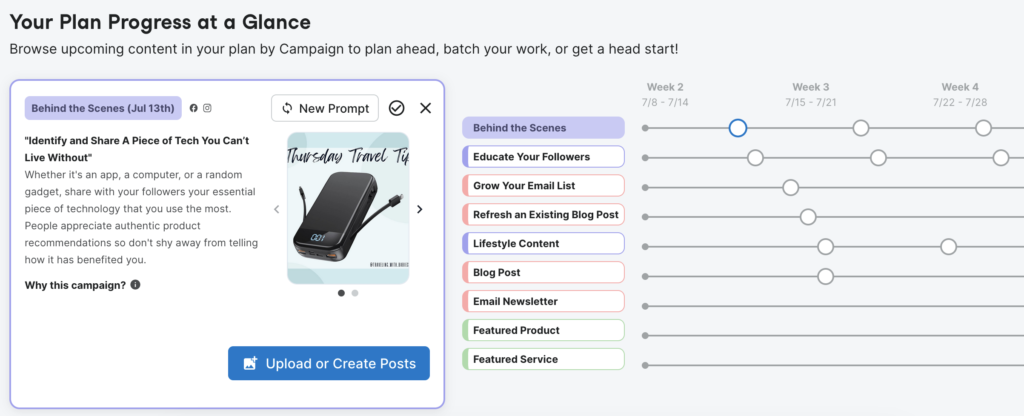
A little feature tailwind came out with recently is their Copilot – basically, they help you create a marketing plan. You answer a few questions about your business, including how many hours per week you have dedicated to digital marketing (blog content, social media posts, and more), and they tailor a marketing content schedule that fits your needs!
And let me tell you – it is so much more than “make an instagram post at this time.” The schedule is specific with ideas that will help you grow your business, whatever that looks like. From refreshing old blog posts to product giveaways, copilot is a huge help for brainstorming and implementing marketing ideas. Honestly, I think that this feature is worth the price alone, but it’s just included!

Create your Content
Design Images
Here at C&S, we like to use Canva for our graphic design – user-friendly, but I’m still able to exercise my creativity and make things from scratch. Their pro plan also has access to a huge image library, and is relatively cheap.
However.
When I’m batching content, especially for Social media, I often don’t have time to design from scratch – especially with a newborn. In my current season of life, efficiency is paramount, so I have found a new love for tailwind‘s design feature. It makes it so easy to pump out good-looking social media posts quickly with my own photos or photos from their stock photo library, my brand’s colors, and my brand’s logo. It’s also a ridiculously easy way to keep branding consistent across all your social media platforms, because it will resize and adjust the design in the optimal size for whatever social media site you’re posting it on.
Write descriptions with AI
Guys, this feature was a game changer. I can’t tell you the number of hours I have spent trying to write pin descriptions – but it’s a lot. And it’s part of my business that I really don’t like – it’s important for the pinterest algorithm, but pin descriptions aren’t huge for the average pinterest user. Because of that, it’s difficult for me to be motivated to write good descriptions on my pins.
Then tailwind releases this feature that writes pin descriptions for you. All of a sudden, I didn’t dread creating pins anymore!
This feature is limited, though, and you only get a certain number of credits to use (1 credit = 1 description) each month. The higher your plan, the more credits you get. I’m on the “pro” plan, and I get 50 per month, while the free plan gives you 20.
P.S. – You can use your ghostwriter credits to write captions for facebook and instagram as well, but I personally don’t like to use AI for writing that are meant for people to read – so I like to write my own. There are some cool features that help you when you write your own captions, though, so keep reading to see what those are!
Create and Monitor Ads
As of July 2023, tailwind is in beta testing for an ads management feature – leveraging their AI software to help creators design effective, targeted advertisements and monitor their performance. I am currently on the waitlist for the beta program, so I can’t speak to it’s ease of use or efficacy yet, but you can read other testimonials here.

Optimize your Content
Find the most relevant hashtags
It may be because I’m a millennial and the bulk and most formative of my experiences with hashtags are as long, ridiculous phrases that would never be searched by anyone, ever, but I struggle with finding relevant hashtags.
#anyothermillenialswithmeonthis? #nothingmakesmefeelolderthanhowquicklytheinternethaschanged
Now, hashtags are read by algorithms to figure out what a post is about, and they are used by humans to search the vast database that is instagram and find content that we are interested in.
I’ve dipped my toes into researching hashtags, and I am learning a lot. However, tailwind’s hashtag finder is hugely helpful with my instagram posts – it helps streamline the process and, realistically, speeds it up. As I’m writing my captions in the instagram scheduler, tailwind will suggest hashtags that not only apply to my post, but that will help it reach a wider audience.
View Analytics
Yes, each social media platform has their own analytics, and if you like to use those to understand engagement and learn what content works and what doesn’t, that’s great. I personally like having my pinterest and instagram insights (they don’t currently do facebook page insights) all in one spot on tailwind, and they do have some additional numbers like an reaction score (total engagements / total posts), an engagement score (total engagements / total posts / total followers), and and engagement rate (the percentage of posts with any engagement).
Their pinterest analytics are a bit more robust, and I have found them to be more accessible and easier to understand than pinterest’s native analytics.
Schedule your Content
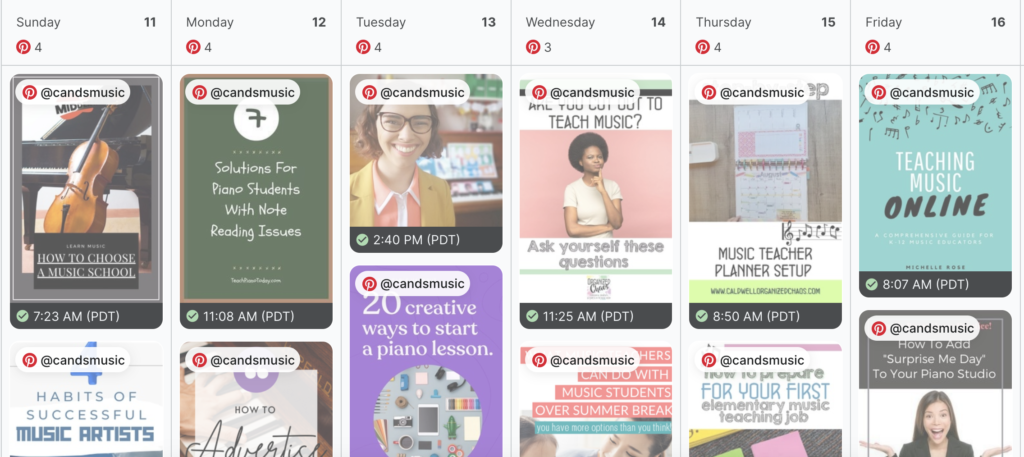
Once you’ve planned, created, and optimized your content, tailwind’s utility still isn’t over – their scheduler is wonderful.
On social media, the times that you post will greatly effect how many people see and engage with your content (yes, even on pinterest). Tailwind has a feature called “smart schedule” that helps you put out your content at the times you will likely see the most engagement. It’s huge!
Also, just from a productivity standpoint, I don’t have time to be managing my social media stuff every single day; I have too much else to do. So batching and scheduling all my posts for the month at once has been a lifesaver – kind of a “set it and forget it” kind of thing. So while it takes a little bit of work up front, it feels almost passive.

Get your Content seen
SmartBio
This is a cool one – you know those instagram profiles that have a link in their bios to an ever-updated landing page? You get a free one of those with tailwind, customizable and everything. It is also linked to your instagram account, so you can easily link top-performing posts to it as well.
For C&S music, as of right now, I use Mailerlite for my email subscribers because, honestly, their free plan is the most robust that I have found. However, there is merit to having all your marketing in one hub, and Tailwind offers that. As with most email marketing programs, each plan has a limit on how many emails you can send per month – the pro plan as a 200 email limit.
On tailwind, you can create forms to capture leads, and then send emails to those leads, up to 200 a month. So if you have more than 200 subscribers, you’ll want to look elsewhere to do your email marketing.
I will say that Tailwind has been pumping out updates and improvements over the past few years, and email marketing is a relatively new feature, so there is a good chance that their program becomes more robust in the near future. And, of course, the other features they offer are more than worth the price.
Communities
Communities, previously known as “Tribes,” is something that sets Tailwind far apart from any other social media scheduler (though, let’s be honest, there are so many things that set them apart). Basically, they are networking circles for pinterest where business owners with similar target audiences re-share each other’s pins.
Total transparency – the circle of musicians and music teachers on tailwind is pretty small. I’m a part of 2 communities that have good engagement, and that’s from just a few accounts. Communities work best when there is a large number of people who actively participate – something that isn’t common right now. But part of the reason I’m writing this post is because I think there is a huge untapped potential for us musicians and private music teachers on pinterest! And the more of us on there, the better our reach.
I made my own community for musicians – you can join it here! Totally free to join and use!
There you have it – tailwind’s main features and how I use them as a private music teacher for my social media.
Like I mentioned above, they have a free plan that is great for limited posts or just to try it out to see if it will work for you and your music studio, but I have found their cheapest plan to be incredibly helpful and effective to grow my music studio pinterest and other social media. I purchased one year up front because they offer a 50% discount on the monthly price when you buy a year!
As always, if you have any questions, my inbox is open to chat, or you can drop a comment below!